Quick Thoughts: OpenCode
After several long months, Publii finally fixed the issue preventing me from uploading new content to my Github page.
And to celebrate, here's a quick look at some stuff I've been working on in that time.
Table of Contents
What is OpenCode?
The website explains it quite well:
OpenCode is an open source agent that helps you write code in your terminal, IDE, or desktop.
The desktop app is the newest part of the stack, and is currently a beta. I have been using the desktop app for the past three weeks, so that's what I'll discuss.
Basic UXUI
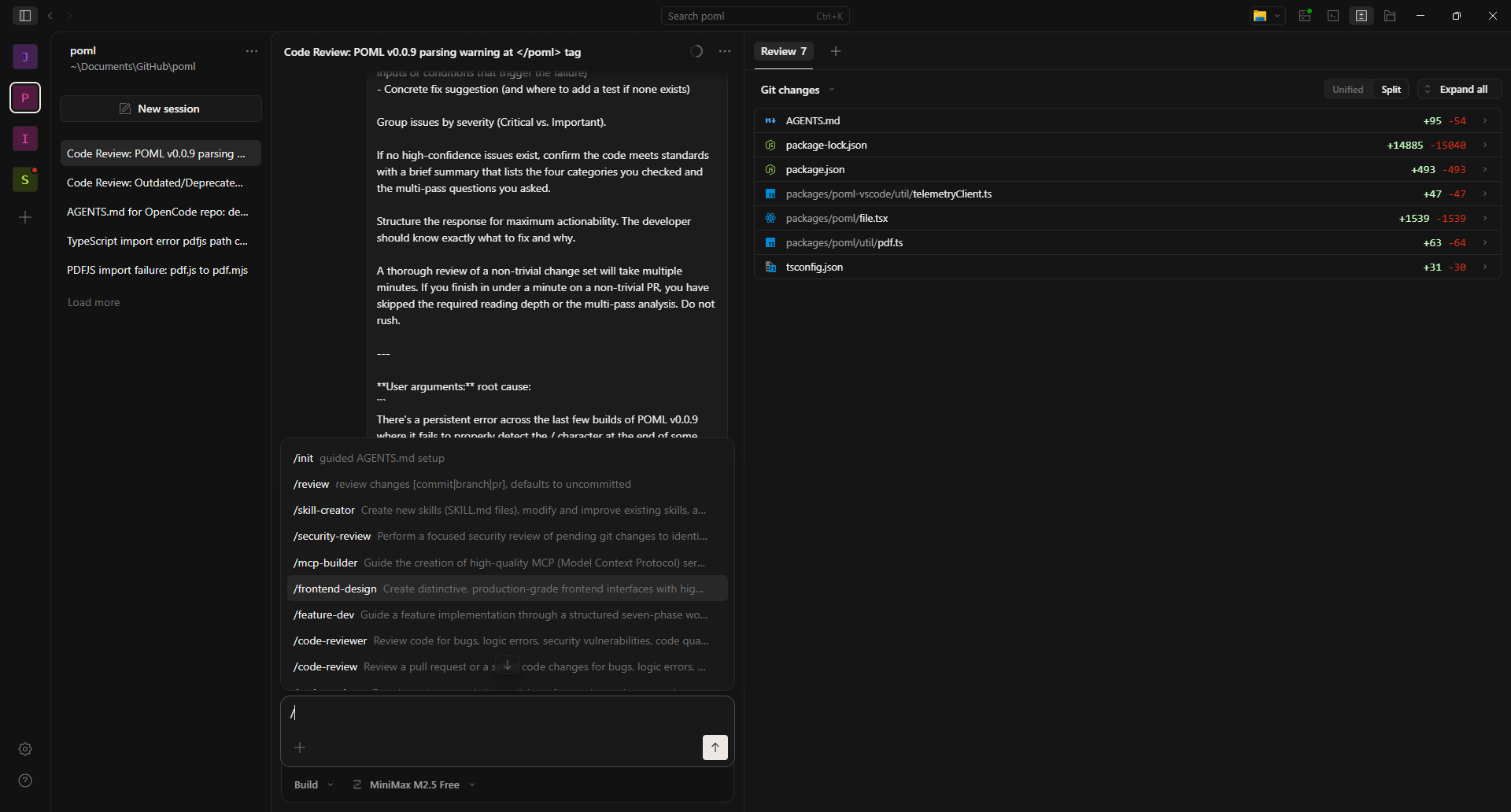
The UI is a basic three section UI. Going from left to right:
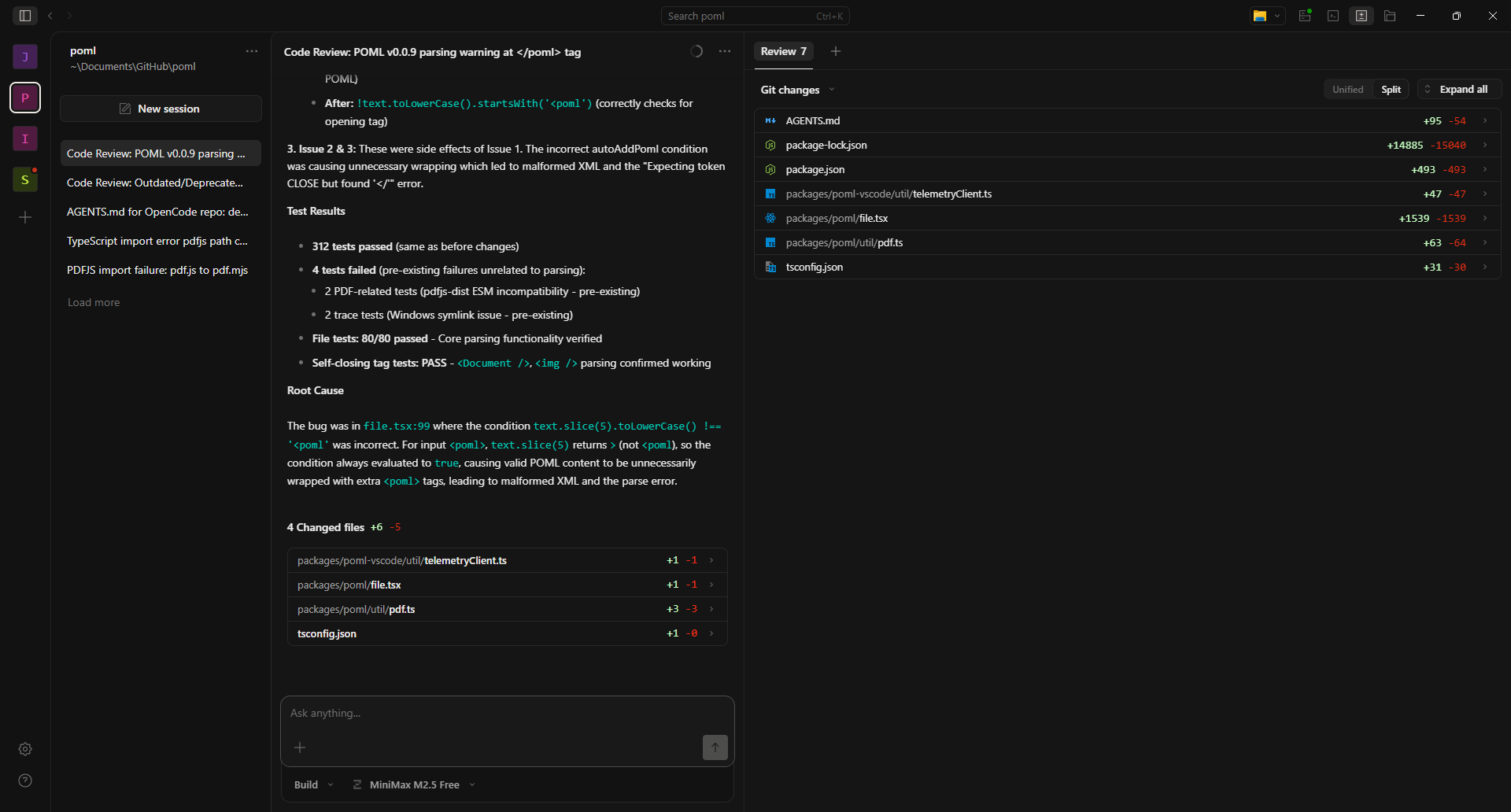
- Navigation - Project selection and session/conversation selection.
- Session - User interaction with the AI agent.
- Multifunction - Deeper project information, such as tracking changes, tracking session statistics, etc...
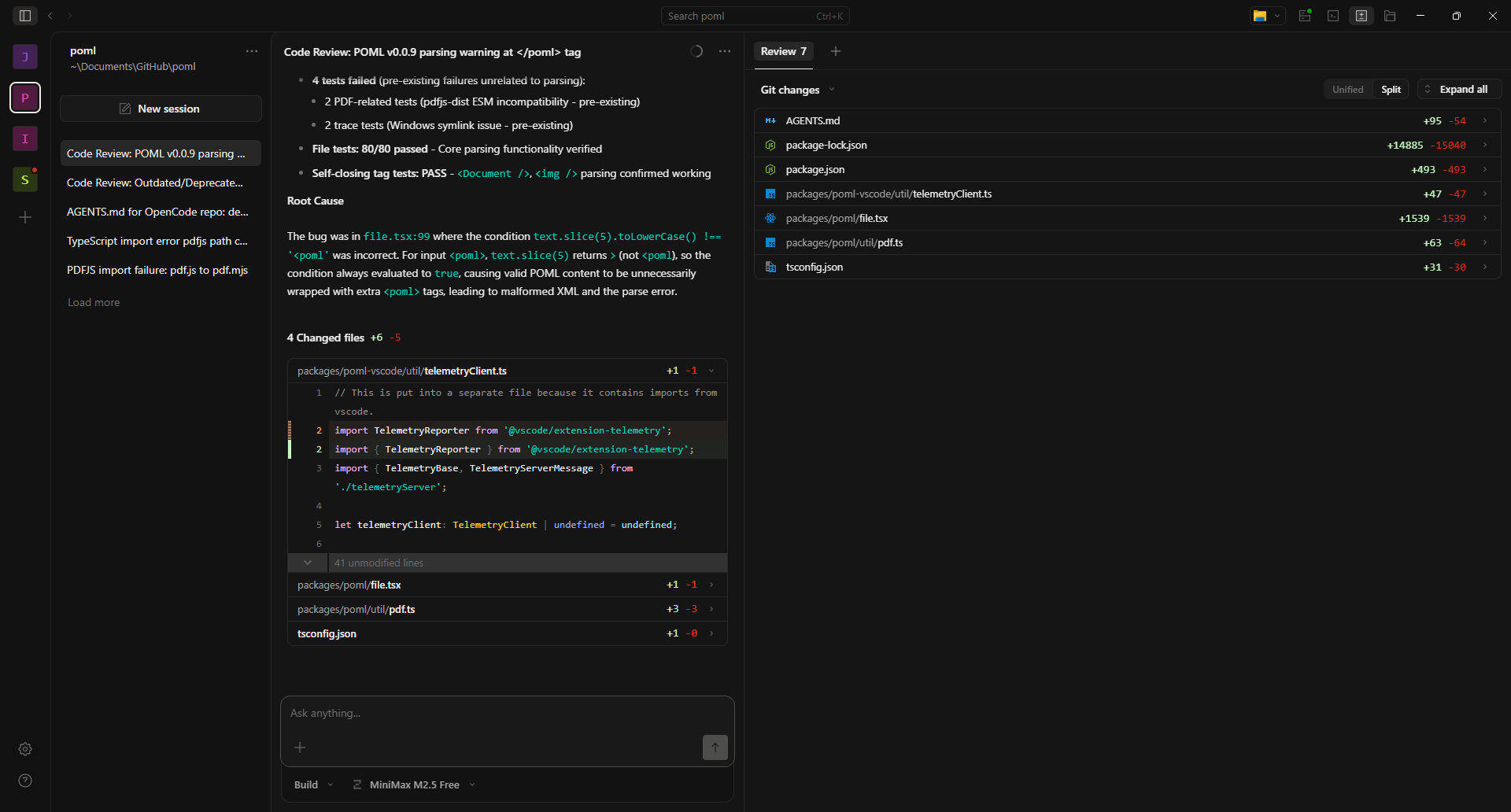
One quality of life feature is the integration of changes into the session display. They will all default to a closed accordion section, which keeps things nice and compact. Opening the accordion will display the specific changes made to a file.
Most of the user's time and attention will be spent interacting with the Session section, providing instruction to the AI. Pressing / will bring up a list of available agents, which can be used to accomplish the goals for the project.
Basic Workflow
After installing the OpenCode application, the process to start using OpenCode is very simple:
- Press the
+button on the left toOpen Project. - Navigate to the project folder.
- Press
Open. - Allow OpenCode to import the project.
- Once import is complete, go down to the bottom to select mode and model.
- Use
/initto create anAgents.mdfile for your project.
While you can work without an Agents.md file or supplementary files in a /rules folder, I would not recommend this out of the box.
After that, it's basically like any other AI chat interface, using / commands to bring up a list of agents for specific tasks. You set the goal/provide the LLM information to analyze, and it gets to work.
By default, there's an audio cue and a notification for when a task completes, and once that's done, you provide more input.
There are two modes OpenCode operates in:
- Plan: This mode prevents the AI from actually using tools to make code changes. Like the name says, you are encouraged to use it to plan out what you want to do.
- Build: The AI can use tools to implement changes.
OpenCode provides a selection of free to use LLMs, as well as the ability to connect to multiple cloud or local providers.
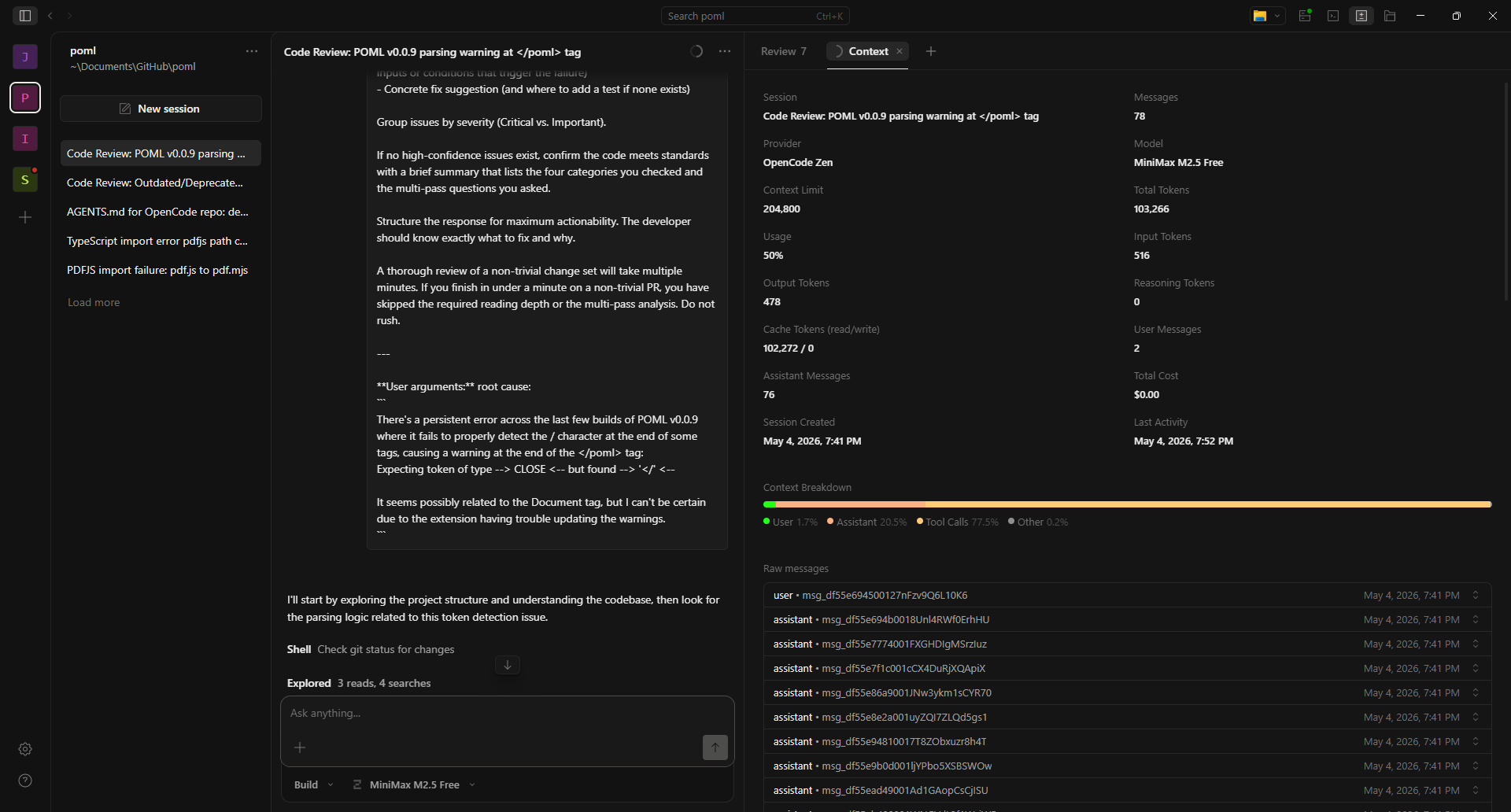
Clicking on the little circle in the session title bar provides access to the Context tab in the Multifunction area. The top half of that tab is full of statistics related how your specific session has used its token budget. Under that is a set of accordions full of each prompt to and response from the LLM.
What I Don't Like About OpenCode
I'll start here, because a lot of the out of the box experience is not great.
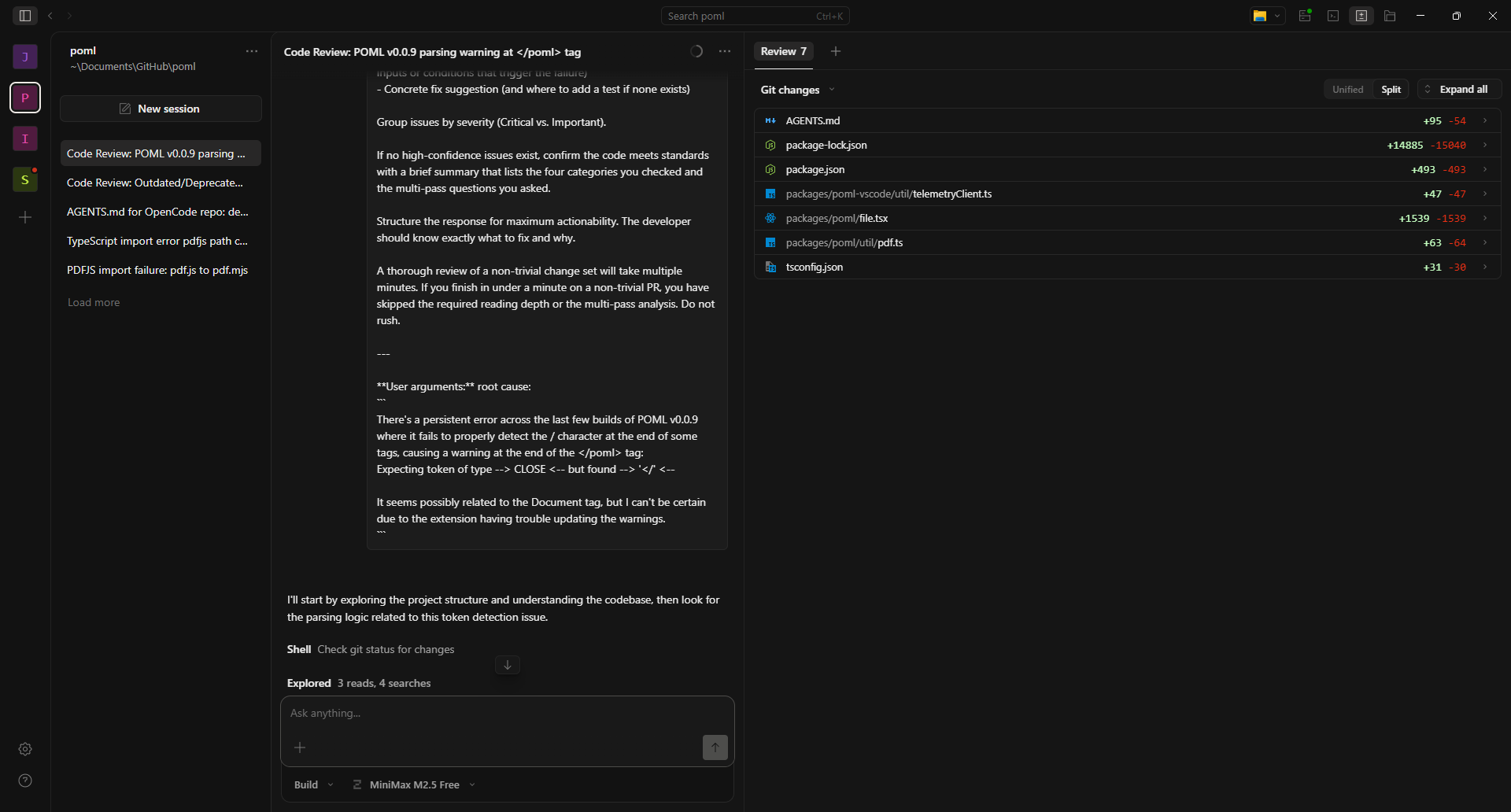
User prompt styling: Or rather, the absolute lack of styling (see above image). User prompts remain raw text format, which is not so much an issue with short inputs like Implement the fix. However, for longer inputs, like a code/error log dump, or even just the agent prompts, it quickly becomes unwieldy and hard to navigate when trying to examine past inputs.
Barebones agent selection: This is probably less of an issue for anyone who's tracking the cutting edge subreddits, repos, and communities on a day-to-day basis, but for everyone else, it's pretty awful. Yes, you can make your own agents with other LLMs, but the starting agent selection is barely enough to do anything with, especially for a novice.
Project Load Issues: This is a recurring issue with OpenCode, especially when adding a new project. What will typically happen is that the multifunction section of the UI will fail to populate with all the files in the project, at least until the user restarts OpenCode. Work can be done on the project, as the files can be read, but the user doesn't have any confirmation that the files are even loaded until the session starts responding.
Conversation Issues: Somewhat similar to the project load issues, and possibly related. When starting a session, there's a non-zero chance that the conversation section will fail to update until the user selects another session, then returns to the first session.
UI Lag Causing Duplicate Sessions: Sometimes the UI lags, creating the impression that a session failed to initiate, leading to a user creating more sessions. When the final session is made, the other, older sessions are visible and active, hammering the model being used with duplicate queries.
Review Tab Issues: The Review tab is the default view on the multifunction section of the UI. This seems to default to using Git to track changes, which is not an issue. However, what is an issue is that every time you add a project, it lists files as adding and deleting lines, making tracking which files have actually had changes made borderline impossible.
Local Model Provider Limitations: If your local AI server is not Ollama or LM Studio, life will be rough. Why? Because even if your local server is OpenAI API compatible, there's no guarantee that OpenCode will be able to fully detect all your models. This is especially an issue in Lemonade, which has added support for external folders for storing LLMs. Any models in that folder will not be loaded, even if you call them properly.
In addition, adding custom local providers only has two methods of adding/changing models:
- Add them through the GUI, which requires completely removing the old server entry and making a new entry.
- Editing the
opencode.jsonfile in.config.
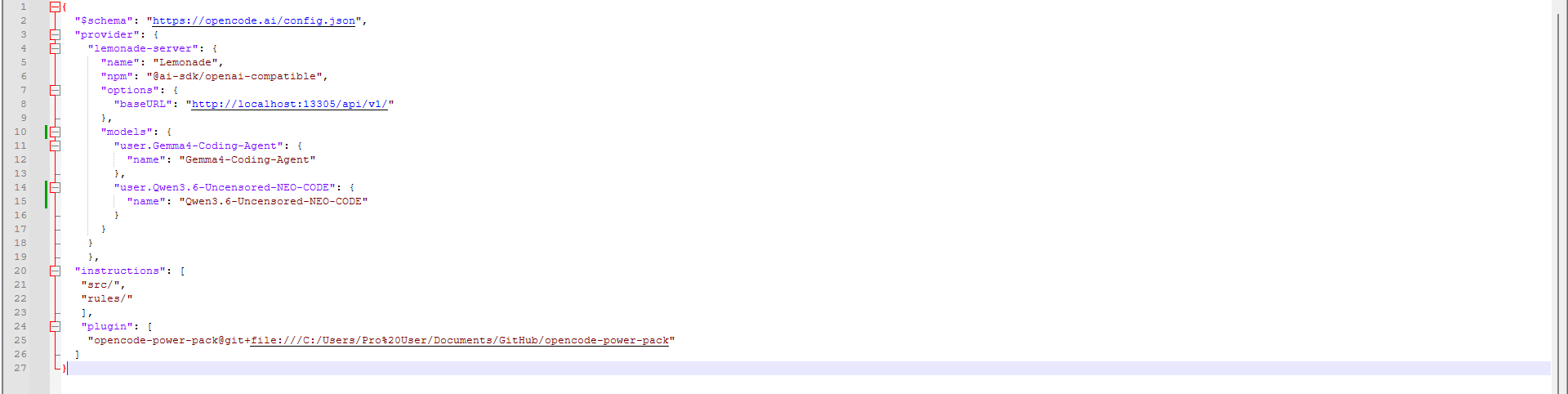
This is obviously suboptimal and not something a novice would think to do.
No Plugin Installation in the Desktop App: Somewhat understandable, as the desktop app is explicitly stated to be a beta. But having a method of installing plugins through the app would solve a lot of problems. Many plugins have the typically unwieldly/non-user friendly installation instructions that make people swear off of open-source software.
Speaking of plugins, let's start talking about what I do like about OpenCode.
What I Like About OpenCode
Plugin Ecosystem: One of the benefits of not being a bleeding edge adopter is that there's plenty of OpenCode plugins, with accompanying tutorials, available. These plugins provide agents and skills, allowing you to customize OpenCode to make it fit your desired uses. You can even expand OpenCode's uses outside of just coding and into creative tasks as well.
OpenCode Power Pack: I would classify this plugin as ESSENTIAL to making OpenCode actually usable for a novice user. It's a port of 11 Claude Code agents to OpenCode, all related to improving your Agents.md file, helping you design and implement features, review and secure code, or create MCP servers. These are all the basic agents you'll need to work effectively with code.
NOTE: The installation is a bit involved, especially on Windows. If your username has spaces, replace them with %20 when pasting your filepath to the cloned Github folder.
MiniMax M2.5 Free: This is one of the free models that OpenCode allows you to use, and it's the most consistent performer, in my experience. With a context limit of 204,800 tokens and reasoning capabilities, it's got more context than the default "Big Pickle" model, while also actually being a model that you do research on. It's not perfect, but if I select the right agent and give it a decent enough prompt, it can usually get the job done.
Support: Since I've started using OpenCode's desktop app, I have seen a minimum of one update a day. This can be validated by checking the releases on their Github page. This level of support is a good sign that it won't be abandoned anytime soon, which is more than can be said for similar, smaller open-source projects.
Native Local AI Support: Believe it or not, but the Open Source software market is genuinely pretty terrible for local AI support. The single dev AI projects tend to be Ollama only, assuming they have any local AI support at all. The ones with the best local support tend to be company backed efforts, where supporting at minimum OpenAI API for local servers is a baseline requirement.
The fact that it natively supports LM Studio and Ollama, the two most common local AI servers, as well as the OpenAI API, means that just about any local AI provider can be used. This doesn't guarantee full feature compatibility (see above), but it makes it easier than ever to go full local AI for your coding tasks.
Reliability: Despite my gripes about the UI, the actual application has been rock solid, and I haven't had any agents go wild. While there are times when the model gets things wrong, I've never had it outright delete data or any other disaster AI scenarios. Based on my experiences so far, I feel confident leaving it alone for an hour or so, because it'll wait for human input once the assigned task is complete.
Outcomes
Assessing a coding tool is pretty useless without actually doing some coding. So what have I been working on?
There are three main OpenCode projects I've been working on.
- Sarna Maps - an open source, TypeScript based SVG map generator.
- POML - a Microsoft Visual Studio Code extension.
- JsonAsAsset - an open source, Unreal Engine plugin for importing assets into uProjects.
None of these were my creations - they are all open source tools that I have used and encountered some issue with:
- Sarna Maps - no support for data sourcing specified in map config file, inability to handle factions with numbers and letters in the identifier. (Example: WZ3A)
- POML - plugin suddenly stopped being able to handle self-closing tags. (Example:
<Document="" />) - JsonAsAsset - Crashing when trying to import/clone Blueprint based files.
I experienced varying levels of success with trying to resolve these issues.
Sarna Maps - allowing data source files to be specified in the map config files was quite easy. Reworking the rest of the system to improve how it handled faction identifiers took several rounds of iteration, as well as adding extensive logging throughout the render and computation pipelines. This eventually did solve the problems... but only for older versions of the data source files.
New versions of the source files have some major changes, causing massive map generation issues, as seen below:
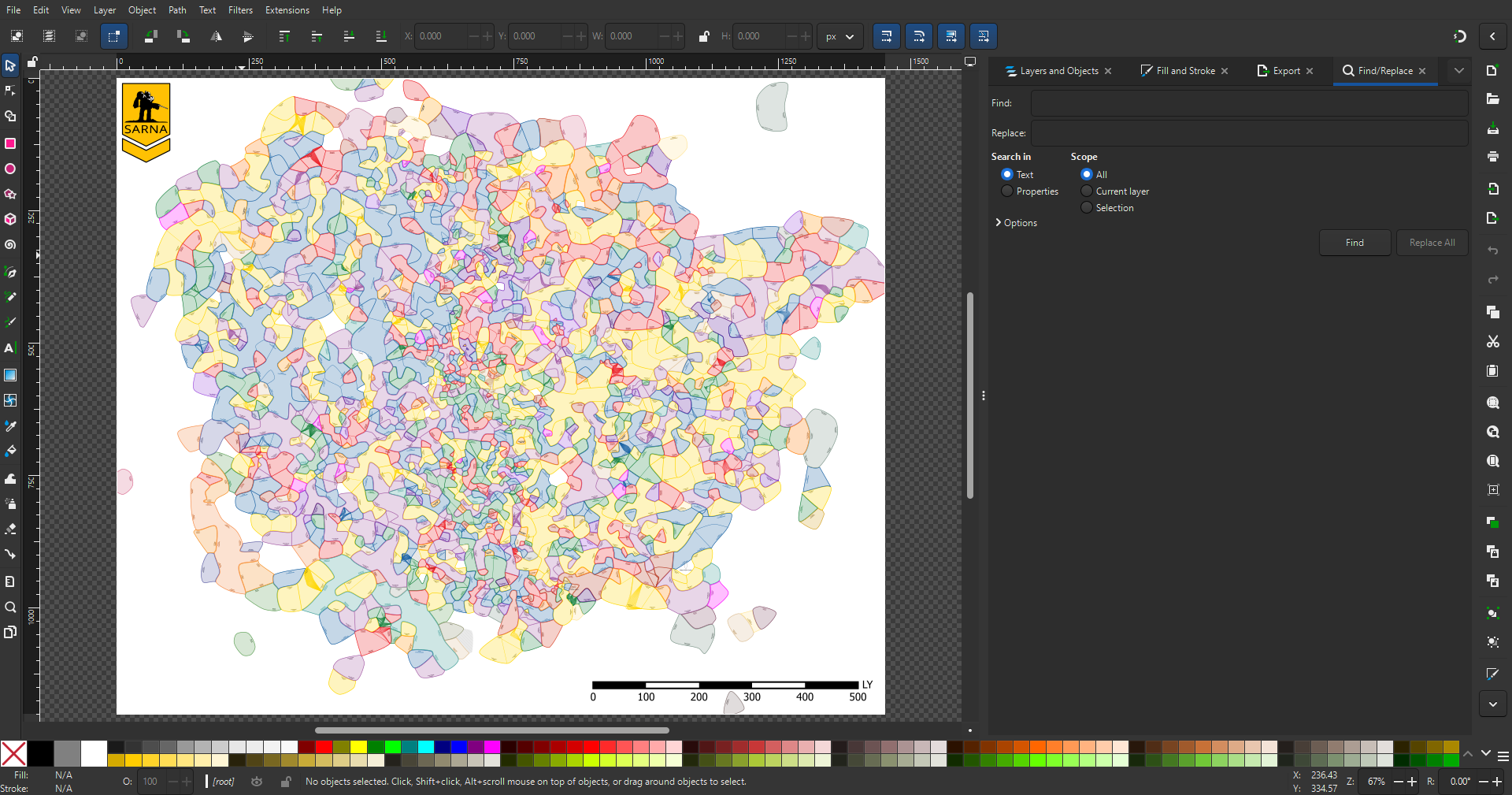
Unfortunately, my logging is insufficient to diagnose the issue, so I have make external scripts to help gather data to resolve this issue.
POML - I attempted to build POML, but ran into a major build error. This then led me to use OpenCode to update the dependencies and replace its sourcing for a highly vulnerable package. By using the /code-reviewer agent and my bug report, OpenCode was able to solve the issue in a single session. I now need to see if I can build the plugin and test it.
JsonAsAsset - This one surprised me, both in the outcomes and how inconsistent it could be. In one case, I attempted to improve importation of a specific type of Blueprint file that serves to store some data. This failed, but by importing several Unreal Engine crash reports and supplying JSON of the Blueprint code, I managed to successfully import some highly complicated Blueprints for characters. Other imports caused errors and some progress was made on resolving those, but sometimes imports would fail without an obvious error.
In general, the problems tend to appear when there's a lack of knowledge about the tasks the LLM is supposed to tackle. This is typically a result of the user not being able to articulate a problem, a lack of log data to help pin down the issue, or both.
However, with the OpenCode Power Pack, adding logging or creating external test scripts in other languages (like Python), is fairly easy. Whether or not they produce the right data is always an issue, but that can be iterated on.
Takeaways
Core Functionality & Features
- Definition: An open source AI agent designed to assist developers directly within a terminal, IDE, or desktop environment.
- Extensibility/Ecosystem: Highly modular and extensible via a plugin system; supports various LLM providers (including local ones like Ollama) through Models.dev.
- Multi-Agent Support: Allows running multiple agents in parallel on the same project for complex tasks.
- Context Management: Maintains session history, allowing users to reference previous interactions and debug issues within a single conversation thread.
Pros (What I Like)
- Strong Community/Support: The rapid development cycle indicates active maintenance by developers who are committed to keeping the tool viable.
- Local LLM Support: Native support for popular local AI servers like Ollama and LM Studio, making it easy to run models entirely offline.
- Extensive Plugin Ecosystem (Power Pack): A large collection of available pre-built agents/skills that significantly expand its utility beyond basic coding tasks (e.g., code review, project planning).
- Reliability: The core application has been stable and hasn’t experienced major failures or data loss during testing periods.
Cons & Issues to Note
- UX/UI Design Foibles: User input remains raw text format which becomes unwieldy for long interactions (e.g., code excerpts, logs).
- Incomplete Feature Set: The desktop app is still in beta and lacks crucial features like plugin installation via the UI, making it difficult to use advanced agents/plugins without manual configuration of config files (opencode.json).
- Project Loading Issues: Can frequently fail to display all project contents until manually restarted by the user.
- Session Persistence Bugs: Occasionally fails to update existing sessions or create new ones correctly, leading to duplicate and active old sessions running in the background (a resource drain).
Workflow & Use Cases
- Two Modes of Operation: Operates in Plan mode (no code changes) for initial design/strategy, and Build mode (with tools enabled) for implementation.
- Workflow Simplicity: The basic process is straightforward: import a project -> define goals via
/initagents file -> interact with the AI using specific commands (/). - Debugging & Iteration Focus: Most effective when paired with external logging or testing scripts to provide necessary context back to the LLM.
Overall Assessment (Summary)
OpenCode is a powerful, open-source tool that provides deep integration into existing developer workflows and supports local AI models effectively. However, it suffers from significant usability issues in its current state — particularly around default agent selection, plugin management, and project loading reliability — which prevent novice users from adopting it easily.