Cybersecurity Project: N8N Workflows - OPNSense API 1.0
One nagging issue with my OPNSense Transparent Filtering Bridge cybersecurity project has been analyzing the data. (Well, okay, the WiFi connection intermittently being inaccessible has been a way bigger deal, but that's not the main issue.) Namely, figuring out what rules are associated with detections.
For whatever reason, in the actual logs generated by OPNsense, the automatically generated rules, which apply to all interfaces, do not receive proper labelling/descriptions. This makes analysis challenging, because the default rules exist for a reason, but not necessarily a cybersecurity reason. Also, the only way to figure out which rule numbers are applied to each rule on a session basis is to dig into the GUI, to a fairly obscure and randomly titled page.
Since OPNSense has an API for remotely interacting with the firewall software, I will attempt to extract this information without using the GUI.
Table of Contents
What is N8N?
N8N is a piece of software for running automations I learned about at a HackCFL presentation.
One of its features is that it can be run locally on a server using Docker. This is free and does not require an account, although you do get a license that provides some extra features if you do setup an account.
Since I have an operational TrueNAS Scale server, I utilized the Docker image on the TrueNAS app marketplace.
The Final Product
Instead of going through the process first, as I usually do, I'll start with the end product, then explain how I got to it.

The actual code is pure JSON:
{
  "nodes": [
    {
      "parameters": {
        "url": "https://<OPNSENSE>/api/firewall/filter/get_interface_list",
        "authentication": "genericCredentialType",
        "genericAuthType": "httpBasicAuth",
        "options": {
          "allowUnauthorizedCerts": true
        }
      },
      "type": "n8n-nodes-base.httpRequest",
      "typeVersion": 4,
      "position": [
        1616,
        464
      ],
      "id": "63da5a01-8b1e-4df9-94d9-7a453507a7ab",
      "name": "HTTP Request - Get Interfaces",
      "retryOnFail": true,
      "waitBetweenTries": 5000,
      "notesInFlow": true,
      "credentials": {
        "httpBasicAuth": {
          "id": "<ID VALUE>",
          "name": "OPNSense API"
        }
      },
      "notes": "3 retries, 5 second delay"
    },
    {
      "parameters": {
        "fieldToSplitOut": "interfaces.items",
        "options": {
          "destinationFieldName": "interface",
          "includeBinary": true
        }
      },
      "type": "n8n-nodes-base.splitOut",
      "typeVersion": 1,
      "position": [
        1792,
        464
      ],
      "id": "b844604a-2f39-435b-8c5d-33b8e4fad194",
      "name": "Split Out Interfaces"
    },
    {
      "parameters": {
        "options": {
          "delimiter": ",",
          "fileName": "OPNsense-Firewall-Stats.csv",
          "headerRow": true
        }
      },
      "type": "n8n-nodes-base.convertToFile",
      "typeVersion": 1,
      "position": [
        2288,
        464
      ],
      "id": "b15ebc2b-ad1a-4dc0-ae32-9f5585b9671c",
      "name": "Convert to File (CSV)"
    },
    {
      "parameters": {
        "rule": {
          "interval": [
            {
              "field": "hours",
              "hoursInterval": 3
            }
          ]
        }
      },
      "type": "n8n-nodes-base.scheduleTrigger",
      "typeVersion": 1.2,
      "position": [
        1456,
        464
      ],
      "id": "8fed87ab-cd63-4367-a34d-fe41fdbaa478",
      "name": "Schedule Trigger"
    },
    {
      "parameters": {
        "url": "=https://<OPNSENSE>/api/firewall/filter/search_rule?interface=opt2&show_all=1",
        "authentication": "genericCredentialType",
        "genericAuthType": "httpBasicAuth",
        "options": {
          "allowUnauthorizedCerts": true
        }
      },
      "type": "n8n-nodes-base.httpRequest",
      "typeVersion": 4,
      "position": [
        1968,
        464
      ],
      "id": "7ce97e2c-945c-4480-8208-d0a6297db3cb",
      "name": "HTTP Request - Get Rules (Bridge)",
      "executeOnce": true,
      "alwaysOutputData": false,
      "credentials": {
        "httpBasicAuth": {
          "id": "<ID VALUE>",
          "name": "OPNSense API"
        }
      }
    },
    {
      "parameters": {
        "jsCode": "// N8N Function node: Format OPNsense rule data for CSV export\n// Input: items[0].json.rows (array of rule objects)\n// Output: one item per CSV row, flattened and ordered for CSV export\n\n// Desired column order for CSV\nconst columnOrder = [\n  \"sort_order\", \"uuid\", \"description\", \"#priority\", \"pf_rules\",\n  \"enabled\", \"disabled\", \"direction\", \"action\", \"replyto\",\n  \"disablereplyto\", \"quick\", \"log\", \"source\", \"source_net\",\n  \"source_port\", \"destination\", \"destination_net\", \"destination_port\",\n  \"legacy\", \"interface\", \"ipprotocol\", \"icmp6-type\", \"statetype\",\n  \"alias_meta_source_network\", \"alias_meta_source_port\",\n  \"alias_meta_destination_net\", \"alias_meta_destination_port\",\n  \"allowopts\", \"gateway\", \"created\", \"updated\", \"seq\", \"ref\",\n  \"evaluations\", \"packets\", \"bytes\", \"states\", \"categories\", \"category\"\n];\n\n// Read rows directly from n8n input\nconst rows = items[0].json.rows || [];\n\n// Sort rows by `sort_order`\nrows.sort((a, b) => {\n  const sa = a.sort_order?.toString() ?? \"\";\n  const sb = b.sort_order?.toString() ?? \"\";\n  return sa.localeCompare(sb);\n});\n\n// Helper: flatten alias arrays into single cell\nfunction flattenAlias(aliasArray) {\n  if (!Array.isArray(aliasArray)) return \"\";\n  return aliasArray.map(a => a.value ?? \"\").join(\"; \");\n}\n\n// Helper: flatten created/updated metadata objects\nfunction flattenMeta(meta) {\n  if (!meta || typeof meta !== \"object\") return \"\";\n  const { username, time, description } = meta;\n  return `user:${username || \"\"} time:${time || \"\"} desc:${description || \"\"}`;\n}\n\n// Helper: replace commas with spaces for ICMP-type fields\nfunction cleanIcmp(val) {\n  if (!val) return \"\";\n  return val.toString().replace(/,/g, \" \");\n}\n\n// Helper: flatten nested or string-based source/destination fields\nfunction flattenNetField(field) {\n  if (!field) return \"\";\n  if (typeof field === \"string\") {\n    // Replace commas with pipes for readability and CSV safety\n    return field.replace(/,/g, \"|\");\n  }\n  if (typeof field === \"object\") {\n    // For object fields, join key/value pairs, and also replace commas in values\n    return Object.entries(field)\n      .map(([k, v]) => `${k}:${String(v).replace(/,/g, \"|\")}`)\n      .join(\"; \");\n  }\n  return \"\";\n}\n\n// Build CSV-ready rows\nconst output = rows.map(r => {\n  const row = {};\n\n  // Flatten alias/meta fields\n  r.alias_meta_source_network = flattenAlias(r.alias_meta_source_net);\n  r.alias_meta_source_port = flattenAlias(r.alias_meta_source_port);\n  r.alias_meta_destination_net = flattenAlias(r.alias_meta_destination_net);\n  r.alias_meta_destination_port = flattenAlias(r.alias_meta_destination_port);\n  r.created = flattenMeta(r.created);\n  r.updated = flattenMeta(r.updated);\n\n  // Flatten and clean network-related subfields\n  r.source_net = flattenNetField(r.source_net);\n  r.destination_net = flattenNetField(r.destination_net);\n  r.source = flattenNetField(r.source);\n  r.destination = flattenNetField(r.destination);\n\n  // Clean ICMP-type fields\n  if (r[\"icmp6-type\"]) r[\"icmp6-type\"] = cleanIcmp(r[\"icmp6-type\"]);\n  if (r[\"icmp-type\"]) r[\"icmp-type\"] = cleanIcmp(r[\"icmp-type\"]);\n\n  // Assemble row in strict column order\n  for (const key of columnOrder) {\n    row[key] = r[key] ?? \"\";\n  }\n\n  return { json: row };\n});\n\nreturn output;"
      },
      "type": "n8n-nodes-base.code",
      "typeVersion": 2,
      "position": [
        2128,
        464
      ],
      "id": "7373a715-5b87-4ce1-b9cf-b503dcb2d85f",
      "name": "Format Data"
    },
    {
      "parameters": {
        "operation": "write",
        "fileName": "/<TARGET DIRECTORY>/OPNsense-Firewall-Stats.csv",
        "options": {
          "append": false
        }
      },
      "type": "n8n-nodes-base.readWriteFile",
      "typeVersion": 1,
      "position": [
        2464,
        464
      ],
      "id": "d98f6b5a-8a7d-499d-9165-1d5123a4cb17",
      "name": "Write File to Disk"
    }
  ],
  "connections": {
    "HTTP Request - Get Interfaces": {
      "main": [
        [
          {
            "node": "Split Out Interfaces",
            "type": "main",
            "index": 0
          }
        ]
      ]
    },
    "Split Out Interfaces": {
      "main": [
        [
          {
            "node": "HTTP Request - Get Rules (Bridge)",
            "type": "main",
            "index": 0
          }
        ]
      ]
    },
    "Convert to File (CSV)": {
      "main": [
        [
          {
            "node": "Write File to Disk",
            "type": "main",
            "index": 0
          }
        ]
      ]
    },
    "Schedule Trigger": {
      "main": [
        [
          {
            "node": "HTTP Request - Get Interfaces",
            "type": "main",
            "index": 0
          }
        ]
      ]
    },
    "HTTP Request - Get Rules (Bridge)": {
      "main": [
        [
          {
            "node": "Format Data",
            "type": "main",
            "index": 0
          }
        ]
      ]
    },
    "Format Data": {
      "main": [
        [
          {
            "node": "Convert to File (CSV)",
            "type": "main",
            "index": 0
          }
        ]
      ]
    }
  },
  "pinData": {},
  "meta": {
    "instanceId": "f0a85e81a4cdc5b0ffa6b6bae7015c00d3cc730d040c955859d3b797aaba3ce9"
  }
}
The functionality itself is simple:
- At a scheduled interval, run the workflow.
- The first HTTP request obtains a list of interfaces.
- The list is then split out into individual interfaces.
- Another HTTP request is made, just to obtain the rules applied to Transparent Filtering Bridge interace.
- The data from query is passed onto a JavaScript function that sorts it into a human readable format.
- The data is passed on and converted to CSV.
- The file is written to a drive in the NAS.
Preparation
Prior to starting the project, I did the following.
First, I examined the OPNSense API documentation. Like many sets of documentation, it was overwhelming and not very useful for anyone who wanted to get a simple task done. It also did not provide clarity on what data I could extract from the interface or firewall. However, its utility improved once I had more experience with using the API.
Second, I created a new user group and user for use with the API. This user was imaginatively named "n8n" and provided with full permissions. While highly sub-optimal, I opted for this choice based on the fact that I had no knowledge of what data a specific API call would provide. Since the permissions were applied to the group, permissions management was simplified. Once workflow development is complete, I can simply prune the permissions back down to the absolute necessities.
Third, I created a ChatGPT project to collect N8N related conversations for creating and/or refining workflows.
Process
Since I didn't have much experience with N8N, I turned to AI to help build out the workflow.
My initial prompt had the following requirements:
- Use the OPNSenseAPI.
- Identify the interfaces.
- Gather the firewall rules from all interfaces.
- Combine the duplicate entries.
- Create a CSV from the data.
After several attempts to generate or revise the workflow, my assessment is that relying on AI (ChatGPT or Copilot) to generate workflows is a bit of a mixed bag.
What it was good at:
- General workflow structure.
- HTTP request nodes.
- API calls.
What it wasn't great at:
- Only using actual known good nodes.
- JavaScript code in the nodes.
- Creating fully connected workflows.
Some of these problems were exacerbated by the fact that I was feeding the workflow too much data to process, but others were signs of hallucinations or other inferencing issues. For example, attempting to get ChatGPT or Copilot to generate HTML nodes focused on extracting data would often fail. When imported into N8N, these nodes would be gray and cause a variety of execution errors.
There were occasions where it would also generate code nodes to do tasks that could be done with other nodes, like HTML data extraction. I'm not entirely sure why this is, but the fact that both AI consistently generate workflows with an older node for running code suggests that their training data hasn't been updated to account for revisions of N8N's nodes.
Many hours were spent attempting to revise or rebuild the workflow, until I decided to reduce the scope of data intake and processing. Once that was done, the final hurdle was coming up with the JavaScript code to sort the data based on the sort order data retrieved through the API, then arrange the data columns in a more readable fashion.
Examining the Output
Here is an example of the final output:
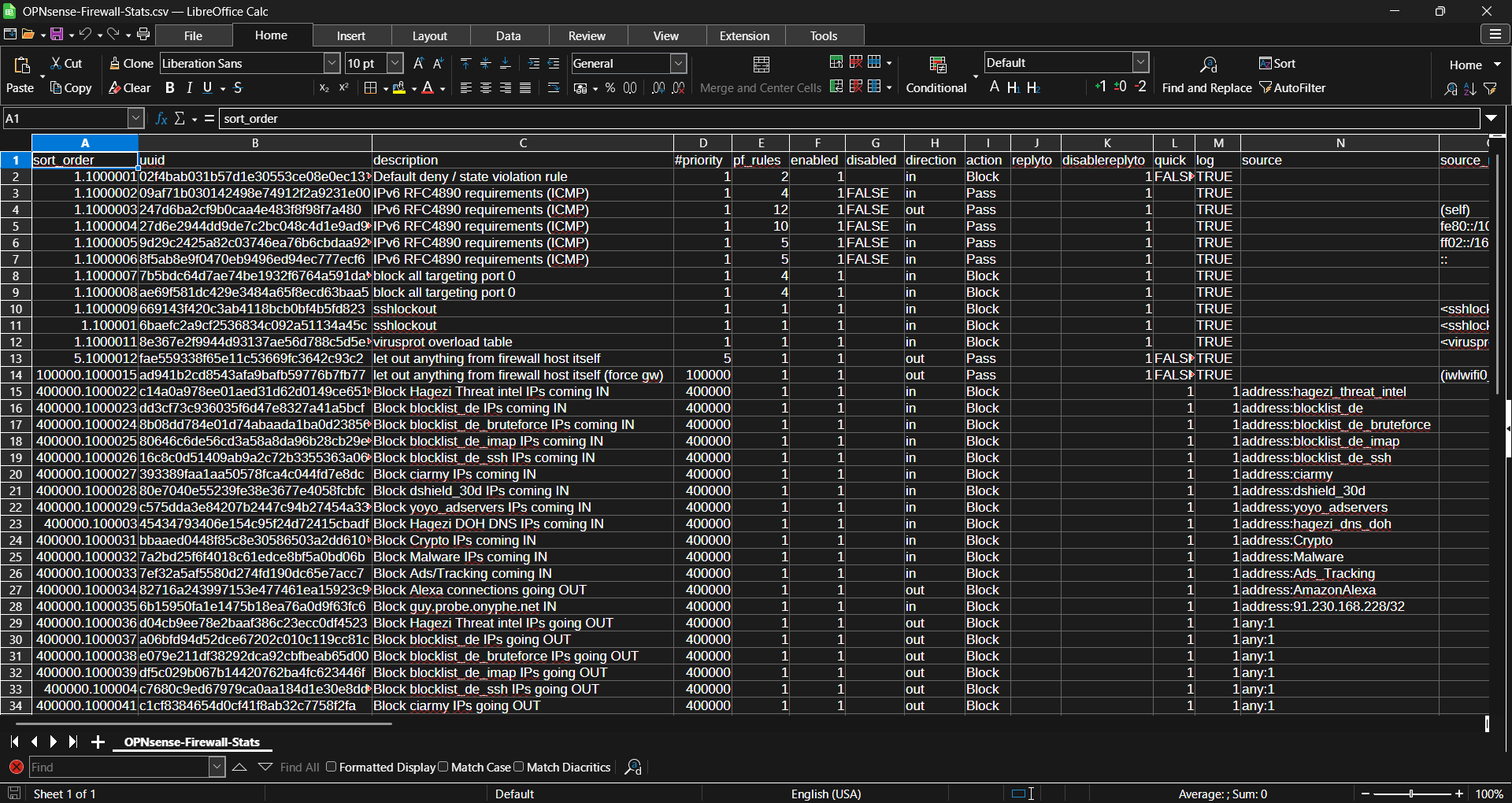
There are multiple data points that be gleaned, even from this partial sample:
- The
sort_orderformat appears to be [PRIORITY NUMBER].[1#####]. - The shortest
sort_ordersuffixes are six digits. pf_rulenumbers are unrelated to sort order.- Several rules, including all the user generated rules, have the same
pf_rulenumbers. - Several fields have FALSE/TRUE/1 responses.
When combined with the fact that every single rule counts as "Automatically generated", several of these points indicate there may be flaws in the OPNSense API. At the very least,